Week 10

Reflection week.

I have come to the end of my blog posting for this course.  That of course does not mean the end to my blogging.  Through the interactions of this unit of work, I have set up Instagram, and snapchat account and viewed my Facebook account a little more.  While I am not a big user of these tools, I do see they can all have a positive use for people in today’s society.  I have really enjoyed blogging and writing down my thoughts.   Blogging has been for me a time of reflection and thought.  It has become a new way of jotting down my thoughts and using it as a diary of my journey as a pre-service teacher.  I have enjoyed connecting to other pre-service teachers and have appreciated the way in which we have all shared our little gems in teaching tools.  I now feel more comfortable with implementing ICT in the classroom as I know I have the network support and resources to provide students with engaging and transformative learning.  I know there is still so much more to learn, but at least I feel I can support students in their use of ICT.  What a journey this has been.

As part of EDC3100 we are to engage in professional experience.  My mentor teacher showed me her reward system which is class dojo’s.  While I have seen this app before, I was completely unaware of the other features it has.  I have only seen it used as a reward system in the classroom.  Parents, teachers and students can connect with each other.  The teacher can take photos or videos of the students learning and send to the class parents.  Students can also post photo or video and add to their portfolio to share with the class.
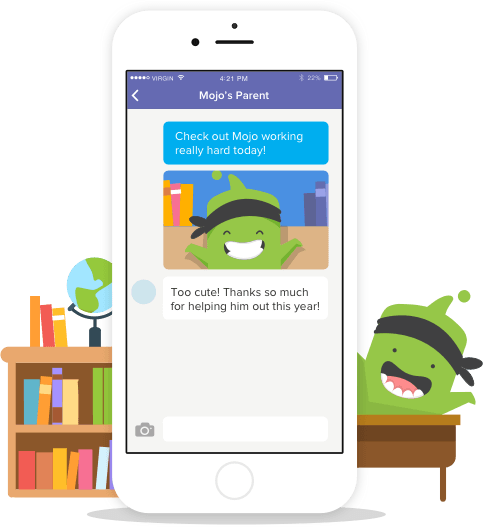
https://www.classdojo.com

Reference:

ClassDojo. (n.d). Happier classrooms.  Retrieved from https://www.classdojo.com/en-gb/?redirect=true


Week 9

For one of my learning activities for assignment 2, part of the formative assessment was to create a timeline of events using an interactive timeline.  I found a wonderful resource in ReadWriteThink (2017).  Students can create a timeline with a description of the event and photo.  What I also discovered about this website is that it has other learning tools that provide great learning tools for students.  For example, there are many templates that help students identify and list key elements about a person for a biography or autobiography (my favourite is the Bio Cube).  There are also resources that help students analyse text and online tools that provide students with a creative way to publish and demonstrate their understanding.  This website is a gem and one that I will use.

The one thing that I am still struggling with, is transformation.  To have the students create and document their findings on an interactive timeline is only amplifying their learning.  Thank goodness for expert lecturers (thanks Chris) who advised me of this and provided me with examples of how to transform this learning.  To transform this activity I asked the students to share their findings and work with other students from across the globe.  Since the topic was on the First Fleet, I felt it fitting to share with a class in Britain and inform them of the activities of their ancestors.  When I was at school, this was unheard of.  This activity highlights how they way we communicate with others has changed over the decades.  For good or bad, it is now our way of life.

Here is the link to ReadWriteThink:

http://www.readwritethink.org/classroom-resources/student-interactives/

Reference:

ReadWriteThink. (2017).

Week 8

For our last assessment piece we are to develop a website that links to our assignment 2 learning activities.  WOW.  Were do I start?  Through this process of developing my website I have become more aware of the use of ICT within the classroom in terms of ethics.  The Australian Institute for Teaching and School Leadership (AITSL) have issued expected standards for the profession.  Following is the expected standard for graduate teachers when it comes to implementing and using ICT in the classroom.

4.5Use ICT safely, responsibly and ethically

Demonstrate an understanding of the relevant issues and the strategies available to support the safe, responsible and ethical use of ICT in learning and teaching (AITSL, 2017).

I was made aware of some amazing videos that are on this website.  Definitely a must watch for pre-service teachers.  Link:  https://www.aitsl.edu.au/teach/standards.

I know from my own experience having teenage children at home, using ICT responsibly and ethically can be a challenge for some children (parents and schools).  Whilst they may not comprehend the impact their use of ICT on others and even themselves, they need the support and guidance so they are aware of their actions and use ICT in a responsible and safe manner.  Whilst students are at school it is the responsibility of the  teacher to demonstrate and guide students how to use ICT appropriately and safely.  I know that when I do enter the classroom on my professional placement, I will ensure I am familiar with the schools’ ICT policy and adhere to their requirements.  What this course has highlighted to me, is fact that we are now in a time where ICT is the ‘norm’ in the educational environment and misuse of it by either student or teacher can have major consequences.

Reference:

The Australian Institute for Teaching and School Leadership [AITSL]. 2017. Australian professional standards for teachers. Graduate.  4.5 Use ICT safely, responsibly and ethically. Retrieved from https://www.aitsl.edu.au/teach/standards

Week 7

My concept map

We are to develop a concept map showing our ICT networks.  I have been working on this since the beginning of the semester and adding to it as the weeks go by.  This concept map as it stands today is by no means exhausted.  I know over the coming weeks, months and years I will be adding more networks to this map.  I created my concept map using Mindjet Mindmanager.

Concept maps are a great tool for students to organise their ideas.  An interactive concept map allows the students to develop their thoughts of a topic and make relevant connections to their ideas.  A concept map can be used for any subject area and choosing the right one for your class is an efficient and effective way for students to represent their ideas.  An interactive concept map is more engaging than writing their ideas onto paper.  Students can use different colours and shapes to connect their ideas.

https://www.mindjet.com/en-mind-mapping-b6/?gclid=EAIaIQobChMI4PKrxN_f1gIV0BNoCh3mwwGNEAAYASAAEgLjd_D_BwE


Reference:

MindManager. (n.d.). Retrieved from https://www.mindjet.com/en-mind-mapping-b6/?gclid=EAIaIQobChMI4PKrxN_f1gIV0BNoCh3mwwGNEAAYASAAEgLjd_D_BwE


My ICT Network (2)

Week 6

This week we took a deeper look into ICT enriched learning experiences that we may include in our assignment.  We were posed with a list of questions to enable us to evaluate the ICT learning experiences and share our reflections and ideas on our blog.

My thoughts around the ICT that I will include in my unit plan always came back to the RAT model.  It is not as easy as you may think to determine if the ICT to be included is transforming the student’s learning.  One of the points that I have taken so far from this course is not all ICT that a teacher places in their classroom has to be transforming.  Yes, at some point it must be transforming but, to enhance a students’ learning through amplification can also produce positive and engaging learning experiences (and makes the teachers day a little bit easier – usually!)  Some questions I have asked myself around the ICTs I have included to evaluate if it is transforming are: Does it create and develop new thinking processes?  Does it facilitate collaboration in an out of the classroom?  Is it used to engage students in the content and does it support curricular goals and learning objectives?  (Rao, 2013) These are just a few questions.  There is so much to consider to ensure the ICT integrated in the lesson is just not a replacement.

Reference:

Rao, A. (2013). What’s the Difference Between “Using Technology” and “Technology       Integration”? Retrieved from https://teachbytes.com/2013/03/29/whats-the-difference-between-using-technology-and-technology-integration/


Week 5

LITERACY AND ICT

How do we link ICT and pedagogy?  There is so many apps and software to use, but how do we know which ones are worthwhile and more importantly ensuring they link to pedagogy and student learning?   Interestingly, in another subject I am doing (Literacy and Pedagogy) we have been given a number of topics are are to chose one to write a critical analytical essay.  One of these topics are ‘how ICTs can support literacies learning.  Of course I jumped at the chance to write 2,000 words on this topic as I can interconnect these two subjects.   The 4 resources model (Luke & Freebody, 2007)  is a perfect example where you can integrate ICT into literacy.  Through peer interaction (teachers helping other teachers by recommending Apps) and my own research, I have no doubt that I can use ICT to deliver an engaging literacy unit while at the same time adhering to the 4 resources model.

four resources model 1.jpg

For the summative assessment in the unit I have developed for my literacy course, the students have an option as to how to present their understanding.  One of those options is to create a SWAY presentation.  I had not heard of this programme until a colleague of mine suggested it when we were discussing something else. Office SWAY in an interactive digital storytelling app where you can create and share your presentations.  A much more up-to-date version of PowerPoint.  This app is very user friendly and middle to upper years would be very capable of using it to create an exciting and engaging presentation.

https://sway.com/

References:

Four Resource Model (n.d.). Retrieved from https://www.google.com/search?site=&tbm=isch&source=hp&biw=1366&bih=618&q=four+resource+model&oq=four+res&gs_l=img.1.0.0l8.816.2153.0.4778.8.7.0.0.0.0.337.1097.2-3j1.4.0….0…1.1.64.img..4.4.1093.T0OJRCzVpcI#imgdii=ma6o5nUktv3zkM:&imgrc=0zEikimjjW9UbM:
Freebody, P., & Luke, A. (1990). Literacies programs: Debates and demands in cultural context. Prospect: Australian Journal of TESOL, 5(7), 7–16. Retrieved from https://eprints.qut.edu.au/49099/1/DOC090312.pdf
Office SWAY. (n.d). Retrieved from https://sway.com/


Week 4

This week we started to work on assignment 2.  We are to design a unit that incorporates ICT and transforms student learning.

For the assignment I have chosen to design a unit for Year 4 – The First Fleet.  Some might say this has been done over and over again.  I agree.  However, I will be implementing ICT into the unit to ensure it is more engaging for the students and authentic.  The new generation are referred to as Digital Natives (Prensky, 2001 as cited in Carroll, 2011) and it would be harmful to students’ progressive learning not to include transformative ICT into the unit.

One of the ICT tools I will be incorporating into the unit is an interactive timeline.  This is a timeline where students can graphically represent their data using pictures.  The use of interactive timelines engages the students and enhances their learning.  See below for the link the the Read Write Think website.  This website has so many interactive learning tools for students.

http://www.readwritethink.org/


Week 4 context model.docx


Figure 1. Developing your context (Dann, 2017)
Reference
Carrroll, J. (2011). From encyclopaedias to search engines: technological change and its impact on literacy learning. Literacy Learning: the middle years, 19(2). 27-34. Retrieved from https://www.alea.edu.au/documents/item/180
Dann, C. (2017). EDX3100 ICT and Pedagogy. Retrieved from https://usqstudydesk.usq.edu.au/m2/course/view.php?id=10924
ReadWriteThink. (2017). Timeline.  Retrieved from http://www.readwritethink.org/files/resources/interactives/timeline_2/


Week 3

This week we looked at constructing knowledge and transforming knowledge.  Knowing the difference between them will assist in developing the unit plan we are to develop for our assignments.  So what are they???

Constructing knowledge is when students learn about concepts, facts or procedures.  The key word here is LEARN.  This can be achieved through teacher directed learning.  Students are required to follow steps, explore and identify.

Transforming knowledge is when we ask students to apply their constructed knowledge and make meaning and transform their learning.  The key word here is APPLY.  This is were students demonstrate they have learned specific skills and are able to evaluate and analyse the information.

Through my work as a teacher aide, I come across some fabulous ICT tools that engage and educate students.  Mathletics is one of these tools.  This online interactive learning tool has activities that align with the Australian Curriculum and allows students to work at their own pace.  Mathletics provides different levels of ability thus giving the teacher the ability to provide differentiation in the classroom.

http://au.mathletics.com/home/primary/?gclid=EAIaIQobChMI_PDOmsLQ1gIVz4VoCh2XEQmAEAAYASABEgK0OPD_BwE

Mathletics for families - primary

References:

Dann, C. (2017). EDC3100 ICT and Pedagogy: Course notes. Toowoomba, Qld: University of Southern Queensland.

Mathletics. (2017). Supporting primary school-aged learners. Retrieved from http://au.mathletics.com/home/primary/?gclid=EAIaIQobChMI_PDOmsLQ1gIVz4VoCh2XEQmAEAAYASABEgK0OPD_BwE

Week 2


This week the RAT model was introduced.  Very interesting.  I have not thought about this before.  It is a model to follow to ensure that you as a teacher are not using ICT ‘merely as a different means to the same instructional end’ (Hughes, Thomas & Scharber, 2006) but amplifying or transforming your students’ learning process.

rat


One of the requirements for this blog is to build a concept map that displays our ICT networks.  A concept map can be used in many ways in the classroom.  A concept map can help students to visually organise their ideas and can easily be used within any content area (WETA, n.d).  There are two ways a teacher could use a concept map.  Print one from online or have older students create one online.  Below is an example of how to use a concept map online.  I found this concept mapping tool from Popplet very easy to use.

Popplet: https://popplet.com/

Image result for popplet examples


References: Image: Kern, M. (2016). Rat Model. Retrieved July 27, 2017, from: http://www.slideshare.net/monikakernz/rat-model-explained-by-esther-casey 

Hughes, J., Thomas, R. & Scharber, C. (2006). Assessing Technology Integration: The RAT – Replacement, Amplification, and Transformation – Framework. In C. Crawford, R. Carlsen,

K. McFerrin, J. Price, R. Weber & D. Willis (Eds.), Proceedings of Society for Information Technology & Teacher Education International Conference 2006 (pp. 1616-1620). Chesapeake, VA: Association for the Advancement of Computing in Education (AACE). Retrieved from https://www.learntechlib.org/p/22293

Popplet. (n.d). Popplet for school.  Retrieved from https://popplet.com/

WETA. (n.d.). Launching young readers. Reading rockets. Retrieved from http://www.readingrockets.org/strategies/concept_maps

Week 1

This week sees the commencement of semester 2.  The beginning of my 3rd year of study.  The beginning of each semester is packed with information (assessment pieces, expectations, readings etc.)  and this semester is no different.  Sifting through my 3 subjects this semester, I discover there is a component of ICT in each of the them.  I have now realised the importance ICT has in the classroom.  It has now become a feature of the everyday learnings of our students.

In this first week, we looked at what supports teachers to become ICT literate (Dann, 2017).  There were 10 dot points, but the one the stood out for me was policy issues.  Before we even start to consider implementing ICT into the classroom as part of our everyday practice, we need to ensure we know the policy and procedures of the school.

Below is the Qld Education ICT policy:

http://ppr.det.qld.gov.au/corp/ict/management/Pages/Information-Communication-and-Technology-(ICT).aspx

We also explored setting up our blog page.  What a wonderful tool to use in the classroom.  A class blog could be set up for students to use as a discussion forum.  It could be used for a unit topic as students could post blogs on what they have found out about the topic and share with their classmates.  As I have discovered, a blog is easy to set up and can provide a network for people to share their ideas and thoughts.

Reference:

Dann, C. (2017). EDX3100 ICT and pedagogy. Course notes. Toowoomba, Qld: University of        Southern Queensland.

Department of Education and Training. (2017). Information and communication          technology (ICT).  Retrieved      from http://ppr.det.qld.gov.au/corp/ict/management/Pages/Information-Communication-and-Technology-(ICT).aspx


Barbc.blog

... part of my teaching journey

Jade Liang

A blog on early childhood education

ICT & PEDAGOGY

A preservice teacher's journey into the possibilites of digital technologies in education

Dare to Learn

Understanding the ins and outs of ICT

thuyedc3100.wordpress.com/

EDC 3100 - ICT and Pedagogy

Journey Ahead

The roller coaster ride of life as a pre-service teacher, mother, wife, employee and friend

Getting switched on with ICTs

EDC3100 ICT & Pedagogy

EDC3100

Tannie's ICT Learning Journey

reshmashuaib

My Journey Through EDC3100!

McK EDC3100

THOUGHTS AND MUSINGS OF THE EDUCATIONAL JOURNEY OF A PRE-SERVICE TEACHER

3100 in 7275

Studying ICT in Tassie

EDC3100 ICT BLOG

A pre-service teachers journey in discovering the connection and impact of ICT and pedagogy

EDC3100 Blog

A blog dedicated to the connection and impact of ICT and Pedagogy.

The Daily Post

The Art and Craft of Blogging

Design a site like this with WordPress.com
Get started